MCP Integration
TREK includes a built-in Model Context Protocol (MCP) server that lets AI
assistants — such as Claude Desktop, Cursor, or any MCP-compatible client — read and modify your trip data through a
structured API.
Note: MCP is an addon that must be enabled by your TREK administrator before it becomes available.
Table of Contents
Setup
1. Enable the MCP addon (admin)
An administrator must first enable the MCP addon from the Admin Panel > Addons page. Until enabled, the /mcp
endpoint returns 404 and the MCP section does not appear in user settings.
2. Connect your MCP client
Option A: OAuth 2.1 (recommended)
MCP clients that support OAuth 2.1 (such as Claude Desktop via mcp-remote) authenticate automatically. No token
management required — just provide the server URL:
The path to npx may need to be adjusted for your system (e.g. C:\PROGRA~1\nodejs\npx.cmd on Windows).
What happens automatically:
- The client fetches
/.well-known/oauth-authorization-server to discover the TREK authorization server.
- The client registers itself via Dynamic Client Registration (RFC 7591).
- Your browser opens TREK's consent screen, where you choose which scopes (permissions) to grant.
- The client receives a short-lived access token and a rotating refresh token — no re-authorization needed.
Requirement: The APP_URL environment variable must be set to your TREK instance's public URL for OAuth
discovery to work correctly.
For more control over scopes or to use confidential client mode, pre-create an OAuth client in
Settings > Integrations > MCP > OAuth Clients before connecting. Clients created there have a client secret
(trekcs_ prefix) and fixed scopes that you define up front.
Option B: Static API Token (deprecated)
Deprecated: Static API tokens will stop working in a future version. Migrate to OAuth 2.1 above.
- Go to Settings > Integrations > MCP and create an API token.
- Click Create New Token, give it a name, and copy the token immediately — it is shown only once.
- Add it to your
claude_desktop_config.json:
Static tokens grant full access to all tools and resources (no scope restrictions). Sessions authenticated with a
static token will receive deprecation warnings in the AI client via server instructions and tool results.
Each user can create up to 10 static tokens.
Authentication
TREK's MCP server supports three authentication methods. OAuth 2.1 is the recommended path for all external clients.
| Method |
Token prefix |
Access level |
TTL |
Notes |
| OAuth 2.1 |
trekoa_ |
Scoped (per-consent) |
1 hour |
Recommended. Automatically refreshed via 30-day rolling refresh tokens (trekrf_ prefix). Replay-detected rotation — replayed tokens cascade-revoke the entire chain. |
| Static API token |
trek_ |
Full access |
No expiry |
Deprecated. Triggers deprecation warnings in AI clients. Will be removed in a future release. |
| Web session JWT |
— |
Full access |
Session-based |
Used internally by the TREK web UI. Not intended for external clients. |
All methods require the Authorization: Bearer <token> header (strict scheme enforcement — Bearer required).
OAuth Scopes
When connecting via OAuth 2.1, you grant specific scopes during the consent step. TREK registers only the MCP tools
that match your granted scopes for that session.
| Scope |
Permission |
Group |
trips:read |
View trips & itineraries |
Trips |
trips:write |
Edit trips & itineraries |
Trips |
trips:delete |
Delete trips (irreversible) |
Trips |
trips:share |
Manage share links |
Trips |
places:read |
View places & map data |
Places |
places:write |
Manage places |
Places |
atlas:read |
View Atlas |
Atlas |
atlas:write |
Manage Atlas |
Atlas |
packing:read |
View packing lists |
Packing |
packing:write |
Manage packing lists |
Packing |
todos:read |
View to-do lists |
To-dos |
todos:write |
Manage to-do lists |
To-dos |
budget:read |
View budget |
Budget |
budget:write |
Manage budget |
Budget |
reservations:read |
View reservations |
Reservations |
reservations:write |
Manage reservations |
Reservations |
collab:read |
View collaboration |
Collaboration |
collab:write |
Manage collaboration |
Collaboration |
notifications:read |
View notifications |
Notifications |
notifications:write |
Manage notifications |
Notifications |
vacay:read |
View vacation plans |
Vacation |
vacay:write |
Manage vacation plans |
Vacation |
geo:read |
Maps & geocoding |
Geo |
weather:read |
Weather forecasts |
Weather |
Scope rules:
- A
:write scope implies :read access for the same group (e.g. budget:write also grants budget read access).
- Any
trips:* scope (trips:read, trips:write, trips:delete, or trips:share) grants trip read access.
list_trips and get_trip_summary are always available regardless of scopes — they are navigation tools.- Static tokens and web session JWTs have full access to all tools (equivalent to all scopes).
- Addon-gated tools (Atlas Extended, Collab, Vacay) require both the relevant scope and the addon to be enabled.
Limitations & Important Notes
| Limitation |
Details |
| Admin activation required |
The MCP addon must be enabled by an admin before any user can access it. |
| Per-user scoping |
Each MCP session is scoped to the authenticated user. You can only access trips you own or are a member of. |
| No image uploads |
Cover images cannot be set through MCP. Use the web UI to upload trip covers. |
| Reservations are created as pending |
When the AI creates a reservation, it starts with pending status. You must confirm it manually or ask the AI to set the status to confirmed. |
| Demo mode restrictions |
If TREK is running in demo mode, all write operations through MCP are blocked. |
| Rate limiting |
300 requests per minute per user (configurable via MCP_RATE_LIMIT). Exceeding this returns a 429 error. |
| Per-client rate limiting |
Rate limits are tracked per user-client pair, so each OAuth client has its own independent rate limit window. |
| Session limits |
Maximum 20 concurrent MCP sessions per user (configurable via MCP_MAX_SESSION_PER_USER). Sessions expire after 1 hour of inactivity. |
| Token limits |
Maximum 10 static API tokens per user. Maximum 10 OAuth clients per user. |
| Token revocation |
Deleting a static token or revoking an OAuth session immediately terminates all active MCP sessions for that token/client. |
| OAuth scope enforcement |
Only tools matching your granted OAuth scopes are registered in the session. Calling an out-of-scope tool returns an error. |
| Addon toggle invalidation |
When an admin enables or disables an addon, all active MCP sessions are invalidated and must be re-established. |
| Real-time sync |
Changes made through MCP are broadcast to all connected clients in real-time via WebSocket, just like changes made through the web UI. |
| Addon-gated features |
Some resources and tools are only available when the corresponding addon (Atlas, Collab, Vacay) is enabled by an admin. |
Resources (read-only)
Resources provide read-only access to your TREK data. MCP clients can read these to understand the current state before
making changes.
Core Resources
| Resource |
URI |
Description |
| Trips |
trek://trips |
All trips you own or are a member of |
| Trip Detail |
trek://trips/{tripId} |
Single trip with metadata and member count |
| Days |
trek://trips/{tripId}/days |
Days of a trip with their assigned places |
| Places |
trek://trips/{tripId}/places |
All places/POIs saved in a trip. Supports ?assignment=all|unassigned|assigned |
| Budget |
trek://trips/{tripId}/budget |
Budget and expense items |
| Budget Per-Person |
trek://trips/{tripId}/budget/per-person |
Per-person totals and split breakdown |
| Budget Settlement |
trek://trips/{tripId}/budget/settlement |
Suggested transactions to settle who owes whom |
| Packing |
trek://trips/{tripId}/packing |
Packing checklist |
| Packing Bags |
trek://trips/{tripId}/packing/bags |
Packing bags with their assigned members |
| Reservations |
trek://trips/{tripId}/reservations |
Flights, hotels, restaurants, etc. |
| Day Notes |
trek://trips/{tripId}/days/{dayId}/notes |
Notes for a specific day |
| Accommodations |
trek://trips/{tripId}/accommodations |
Hotels/rentals with check-in/out details |
| Members |
trek://trips/{tripId}/members |
Owner and collaborators |
| Collab Notes |
trek://trips/{tripId}/collab-notes |
Shared collaborative notes |
| Files |
trek://trips/{tripId}/files |
Files attached to a trip (excludes trashed files) |
| To-Dos |
trek://trips/{tripId}/todos |
To-do items ordered by position |
| Categories |
trek://categories |
Available place categories (for use when creating places) |
| Bucket List |
trek://bucket-list |
Your personal travel bucket list |
| Visited Countries |
trek://visited-countries |
Countries marked as visited in Atlas |
| Notifications |
trek://notifications/in-app |
Your in-app notifications (most recent 50, unread first) |
Addon-Gated Resources
These resources are only available when the corresponding addon is enabled by an admin.
| Resource |
URI |
Addon |
Description |
| Atlas Stats |
trek://atlas/stats |
Atlas |
Visited country counts and continent breakdown |
| Atlas Regions |
trek://atlas/regions |
Atlas |
Manually visited sub-country regions |
| Collab Polls |
trek://trips/{tripId}/collab/polls |
Collab |
All polls for a trip with vote counts per option |
| Collab Messages |
trek://trips/{tripId}/collab/messages |
Collab |
Most recent 100 chat messages for a trip |
| Vacay Plan |
trek://vacay/plan |
Vacay |
Full snapshot of your active vacation plan (members, years, config) |
| Vacay Entries |
trek://vacay/entries/{year} |
Vacay |
All vacation day entries for the active plan and a specific year |
| Vacay Holidays |
trek://vacay/holidays/{year} |
Vacay |
Public holidays for the plan's configured region and year |
Tools (read-write)
TREK exposes tools organized by feature area. Use get_trip_summary as a starting point — it returns everything about a
trip in a single call.
Trip Summary
| Tool |
Description |
get_trip_summary |
Full denormalized snapshot of a trip: metadata, members, days with assignments and notes, accommodations, budget, packing, reservations, collab notes, to-dos, files, and poll/message counts. Use this as your context loader. |
Trips
| Tool |
Description |
list_trips |
List all trips you own or are a member of. Supports include_archived flag. |
create_trip |
Create a new trip with title, dates, currency. Days are auto-generated from the date range. |
update_trip |
Update a trip's title, description, dates, or currency. |
delete_trip |
Delete a trip. Owner only. |
list_trip_members |
List the owner and all collaborators of a trip. |
add_trip_member |
Add a user to a trip by username or email. Owner only. |
remove_trip_member |
Remove a collaborator from a trip. Owner only. |
copy_trip |
Duplicate a trip (days, places, itinerary, packing, budget, reservations). Packing items are reset to unchecked. |
export_trip_ics |
Export the trip itinerary and reservations as iCalendar (.ics) text for calendar apps. |
get_share_link |
Get the current public share link for a trip and its permission flags. |
create_share_link |
Create or update the public share link with configurable visibility flags (map, bookings, packing, budget, collab). |
delete_share_link |
Revoke the public share link for a trip. |
Places
| Tool |
Description |
list_places |
List places/POIs in a trip, optionally filtered by assignment status, category, tag, or search. |
create_place |
Add a place/POI with name, coordinates, address, category, notes, website, phone, and optional google_place_id / osm_id for opening hours. |
update_place |
Update any field of an existing place including transport mode, timing, and price. |
delete_place |
Remove a place from a trip. |
list_categories |
List all available place categories with id, name, icon and color. |
search_place |
Search for a real-world place by name or address. Returns osm_id and google_place_id for use in create_place. |
Day Planning
| Tool |
Description |
update_day |
Set or clear a day's title (e.g. "Arrival in Paris", "Free day"). |
create_day |
Add a new day to a trip with optional date and notes. |
delete_day |
Delete a day from a trip. |
assign_place_to_day |
Pin a place to a specific day in the itinerary. |
unassign_place |
Remove a place assignment from a day. |
reorder_day_assignments |
Reorder places within a day by providing assignment IDs in the desired order. |
update_assignment_time |
Set start/end times for a place assignment (e.g. "09:00" – "11:30"). Pass null to clear. |
move_assignment |
Move a place assignment to a different day. |
get_assignment_participants |
Get the list of users participating in a specific place assignment. |
set_assignment_participants |
Set participants for a place assignment (replaces current list). |
Accommodations
| Tool |
Description |
create_accommodation |
Add an accommodation (hotel, Airbnb, etc.) linked to a place and a check-in/out date range. |
update_accommodation |
Update fields on an existing accommodation (dates, times, confirmation, notes). |
delete_accommodation |
Delete an accommodation record from a trip. |
Reservations
| Tool |
Description |
create_reservation |
Create a pending reservation. Supports flights, hotels, restaurants, trains, cars, cruises, events, tours, activities, and other types. Hotels can be linked to places and check-in/out days. |
update_reservation |
Update any field including status (pending / confirmed / cancelled). |
delete_reservation |
Delete a reservation and its linked accommodation record if applicable. |
reorder_reservations |
Update the display order of reservations within a day. |
link_hotel_accommodation |
Set or update a hotel reservation's check-in/out day links and associated place. |
Budget
| Tool |
Description |
create_budget_item |
Add an expense with name, category, and price. |
update_budget_item |
Update an expense's details, split (persons/days), or notes. |
delete_budget_item |
Remove a budget item. |
set_budget_item_members |
Set which trip members are splitting a budget item (replaces current member list). |
toggle_budget_member_paid |
Mark or unmark a member as having paid their share of a budget item. |
Packing
| Tool |
Description |
create_packing_item |
Add an item to the packing checklist with optional category. |
update_packing_item |
Rename an item or change its category. |
toggle_packing_item |
Check or uncheck a packing item. |
delete_packing_item |
Remove a packing item. |
reorder_packing_items |
Set the display order of packing items within a trip. |
bulk_import_packing |
Import multiple packing items at once from a list (with optional quantity). |
apply_packing_template |
Apply a saved packing template to a trip (adds items from the template). |
save_packing_template |
Save the current packing list as a reusable template. |
list_packing_bags |
List all packing bags for a trip. |
create_packing_bag |
Create a new packing bag (e.g. "Carry-on", "Checked bag"). |
update_packing_bag |
Rename or recolor a packing bag. |
delete_packing_bag |
Delete a packing bag (items are unassigned, not deleted). |
set_bag_members |
Assign trip members to a packing bag. |
get_packing_category_assignees |
Get which trip members are assigned to each packing category. |
set_packing_category_assignees |
Assign trip members to a packing category. |
Day Notes
| Tool |
Description |
create_day_note |
Add a note to a specific day with optional time label and emoji icon. |
update_day_note |
Edit a day note's text, time, or icon. |
delete_day_note |
Remove a note from a day. |
To-Dos
| Tool |
Description |
list_todos |
List all to-do items for a trip, ordered by position. |
create_todo |
Create a to-do item with name, category, due date, description, assignee, and priority. |
update_todo |
Update an existing to-do item. Pass null to clear nullable fields. |
toggle_todo |
Mark a to-do item as done or undone. |
delete_todo |
Delete a to-do item. |
reorder_todos |
Reorder to-do items within a trip by providing a new ordered list of IDs. |
get_todo_category_assignees |
Get the default assignees configured per to-do category for a trip. |
set_todo_category_assignees |
Set default assignees for a to-do category. Pass an empty array to clear. |
Tags
| Tool |
Description |
list_tags |
List all tags belonging to the current user. |
create_tag |
Create a new tag (user-scoped label for places) with optional hex color. |
update_tag |
Update the name or color of an existing tag. |
delete_tag |
Delete a tag (removes it from all places it was attached to). |
Notifications
| Tool |
Description |
list_notifications |
List in-app notifications with pagination and unread filter. |
get_unread_notification_count |
Get the count of unread in-app notifications. |
mark_notification_read |
Mark a single notification as read. |
mark_notification_unread |
Mark a single notification as unread. |
mark_all_notifications_read |
Mark all notifications as read. |
Maps & Weather
| Tool |
Description |
search_place |
Search for a real-world place by name/address and get coordinates, osm_id, and google_place_id. |
get_place_details |
Fetch detailed information (hours, photos, ratings) about a place by its Google Place ID. |
reverse_geocode |
Get a human-readable address for given coordinates. |
resolve_maps_url |
Resolve a Google Maps share URL to coordinates and place name. |
get_weather |
Get weather forecast for a location and date. |
get_detailed_weather |
Get hourly/detailed weather forecast for a location and date. |
Collab Notes
| Tool |
Description |
create_collab_note |
Create a shared note visible to all trip members. Supports title, content, category, and color. |
update_collab_note |
Edit a collab note's content, category, color, or pin status. |
delete_collab_note |
Delete a collab note. |
Collab Polls & Chat (Collab addon required)
| Tool |
Description |
list_collab_polls |
List all polls for a trip. |
create_collab_poll |
Create a new poll with a question, options, optional multiple choice, and deadline. |
vote_collab_poll |
Vote on a poll option (or remove vote if already voted). |
close_collab_poll |
Close a poll so no more votes can be cast. |
delete_collab_poll |
Delete a poll and all its votes. |
list_collab_messages |
List chat messages for a trip (most recent 100, supports pagination via before). |
send_collab_message |
Send a chat message to a trip's collab channel, with optional reply threading. |
delete_collab_message |
Delete a chat message (own messages only). |
react_collab_message |
Toggle a reaction emoji on a chat message. |
Bucket List
| Tool |
Description |
create_bucket_list_item |
Add a destination to your personal bucket list with optional coordinates and country code. |
delete_bucket_list_item |
Remove an item from your bucket list. |
Atlas
| Tool |
Description |
mark_country_visited |
Mark a country as visited using its ISO 3166-1 alpha-2 code (e.g. "FR", "JP"). |
unmark_country_visited |
Remove a country from your visited list. |
Atlas Extended (Atlas addon required)
| Tool |
Description |
get_atlas_stats |
Get atlas statistics — visited country counts, region counts, continent breakdown. |
list_visited_regions |
List all manually visited sub-country regions for the current user. |
mark_region_visited |
Mark a sub-country region as visited (e.g. ISO code "US-CA"). |
unmark_region_visited |
Remove a region from the visited list. |
get_country_atlas_places |
Get places saved in the user's atlas for a specific country. |
update_bucket_list_item |
Update a bucket list item (name, notes, coordinates, target date). |
Vacay (Vacay addon required)
| Tool |
Description |
get_vacay_plan |
Get the current user's active vacation plan (own or joined). |
update_vacay_plan |
Update vacation plan settings (weekend blocking, holidays, carry-over). |
set_vacay_color |
Set the current user's color in the vacation plan calendar. |
get_available_vacay_users |
List users who can be invited to the current vacation plan. |
send_vacay_invite |
Invite a user to join the vacation plan by their user ID. |
accept_vacay_invite |
Accept a pending invitation to join another user's vacation plan. |
decline_vacay_invite |
Decline a pending vacation plan invitation. |
cancel_vacay_invite |
Cancel an outgoing invitation (owner cancels an invite they sent). |
dissolve_vacay_plan |
Dissolve the shared plan — all members return to their own individual plan. |
list_vacay_years |
List calendar years tracked in the current vacation plan. |
add_vacay_year |
Add a calendar year to the vacation plan. |
delete_vacay_year |
Remove a calendar year from the vacation plan. |
get_vacay_entries |
Get all vacation day entries for the active plan and a specific year. |
toggle_vacay_entry |
Toggle a day on or off as a vacation day for the current user. |
toggle_company_holiday |
Toggle a date as a company holiday for the whole plan. |
get_vacay_stats |
Get vacation statistics for a specific year (days used, remaining, carried over). |
update_vacay_stats |
Update the vacation day allowance for a specific user and year. |
add_holiday_calendar |
Add a public holiday calendar (by region code) to the vacation plan. |
update_holiday_calendar |
Update label or color for a holiday calendar. |
delete_holiday_calendar |
Remove a holiday calendar from the vacation plan. |
list_holiday_countries |
List countries available for public holiday calendars. |
list_holidays |
List public holidays for a country and year. |
Prompts
MCP prompts are pre-built context loaders your AI client can invoke to get a structured starting point for common tasks.
| Prompt |
Description |
trip-summary |
Load a formatted summary of a trip (dates, members, days, budget, packing, reservations) before planning or modifying it. |
packing-list |
Get a formatted packing checklist for a trip, grouped by category. |
budget-overview |
Get a formatted budget summary with totals by category and per-person cost. |
token_auth_notice |
Static token deprecation notice and migration guide. Only available in sessions authenticated with a legacy trek_ token. |
Example
Conversation with Claude: https://claude.ai/share/51572203-6a4d-40f8-a6bd-eba09d4b009d
Initial prompt (1st message):
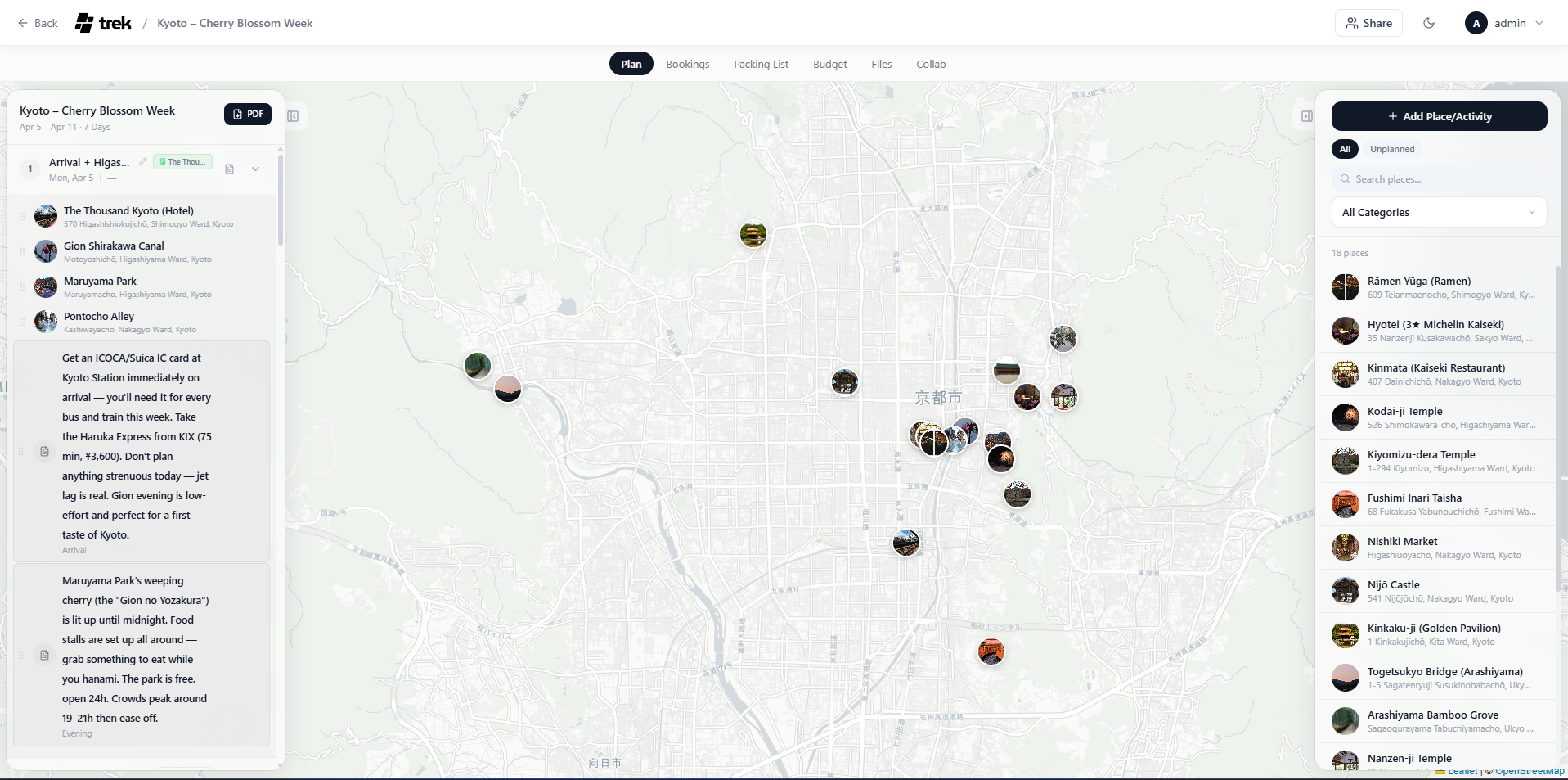
PDF of the generated trip: ./docs/TREK-Generated-by-MCP.pdf
 jubnl
0efa316004
jubnl
0efa316004
